
Dokumataton für ColorJoy.me
Paletten Kontext-Menu
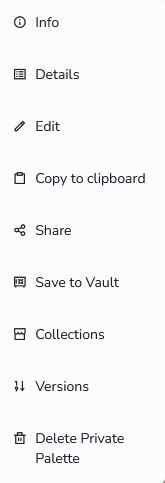
Das Kontextmenü, das unterhalb der Palette verfügbar ist, bietet Zugang zu einigen Optionen. Let's look at them quickly.
Info This shows a quick info for palettes. This is for public palettes a narrative, a appraisal, tags, patches with color codes and emotional associations and to more export options (needs subscription). This info is displayed as an overlay, so you can easily return to the feed by closing the overlay.
Details This option leads you to a dedicated page with more information and displays for the palette.
Edit this opens the palette creator/editor.
Copy to clipboard with copy the color hex values of the palette to the clipboard.
Share Opens another overlay with options to share a palette in different channels.
Save to vault This will save the palette to your vault, if you are signed in. Signed in users with subscription can save as many palettes as they want. For all others, they can save 25.
Collections For subscribed users this opens an overlay to access your collections. You can associate a palette with one or more collections or remove it.
Delete Private Palette In case you have created the palette as a private palette, than you can delete it here. This option is only available on private palettes created by you.